Otter.ai
AI Productivity Tools
AI-powered transcription and meeting assistant that automatically records and transcribes conversations.
Visit Otter.aiWe regularly update our reviews to reflect the latest features, pricing changes, and our ongoing testing experience.
🌟 The Clear Pros
- ✓Accurate Transcription: 85-95% accuracy rate
- ✓Real-Time Transcription: Live transcription during meetings
- ✓Speaker Identification: Automatically identifies speakers
- ✓Integration: Works with Zoom, Google Meet, Teams
- ✓Collaboration Features: Share and edit transcripts with team
- ✓Search Functionality: Search within audio recordings
- ✓Mobile App: Excellent iOS and Android apps
- ✓Free Tier: Generous 600 minutes/month free
🚧 The Honest Cons
- ✗Accuracy Varies: Struggles with accents and background noise
- ✗Privacy Concerns: Audio stored on cloud servers
- ✗Limited Editing: Basic transcript editing features
- ✗Free Plan Restrictions: 600 minutes cap monthly
- ✗No Offline Mode: Requires internet connection
- ✗Export Limitations: Limited export formats on free plan
🚫 Who Should NOT Buy This Tool
Otter.ai may not suit:
- Heavy users: Free 600-minute limit fills quickly for frequent transcribers.
- Privacy-sensitive industries: Cloud storage may not meet compliance requirements.
- Non-English speakers: Primarily optimized for English transcription.
- Offline workers: Requires constant internet connectivity.
Full Review
Otter.ai Review: Is This AI Transcription Tool Worth It in 2026?
I remember the days of frantically scribbling notes during meetings, desperately trying to capture every nuance while simultaneously participating in the discussion. It was a recipe for disaster, often resulting in incomplete notes and a lingering sense of anxiety. Then, a colleague introduced me to Otter.ai, and it felt like a weight had been lifted. But is Otter.ai still the best in 2026, with a plethora of AI transcription tools vying for attention? Let's dive in and see. This Otter.ai review will cover my personal experiences, key features, pricing, pros, cons, and ultimately, whether or not it's the right tool for you.
What Is Otter.ai?
Otter.ai is an AI-powered meeting transcription and note-taking tool designed to automatically transcribe audio and video recordings in real-time or after the fact. It uses sophisticated speech recognition algorithms to convert speech to text, making it incredibly useful for meetings, interviews, lectures, and even personal voice notes. Beyond simple transcription, Otter.ai also offers features like speaker identification, keyword extraction, and automated summaries, making it a comprehensive solution for improving productivity and accessibility. In essence, it's your virtual note-taker, allowing you to focus on the conversation instead of the frantic writing.
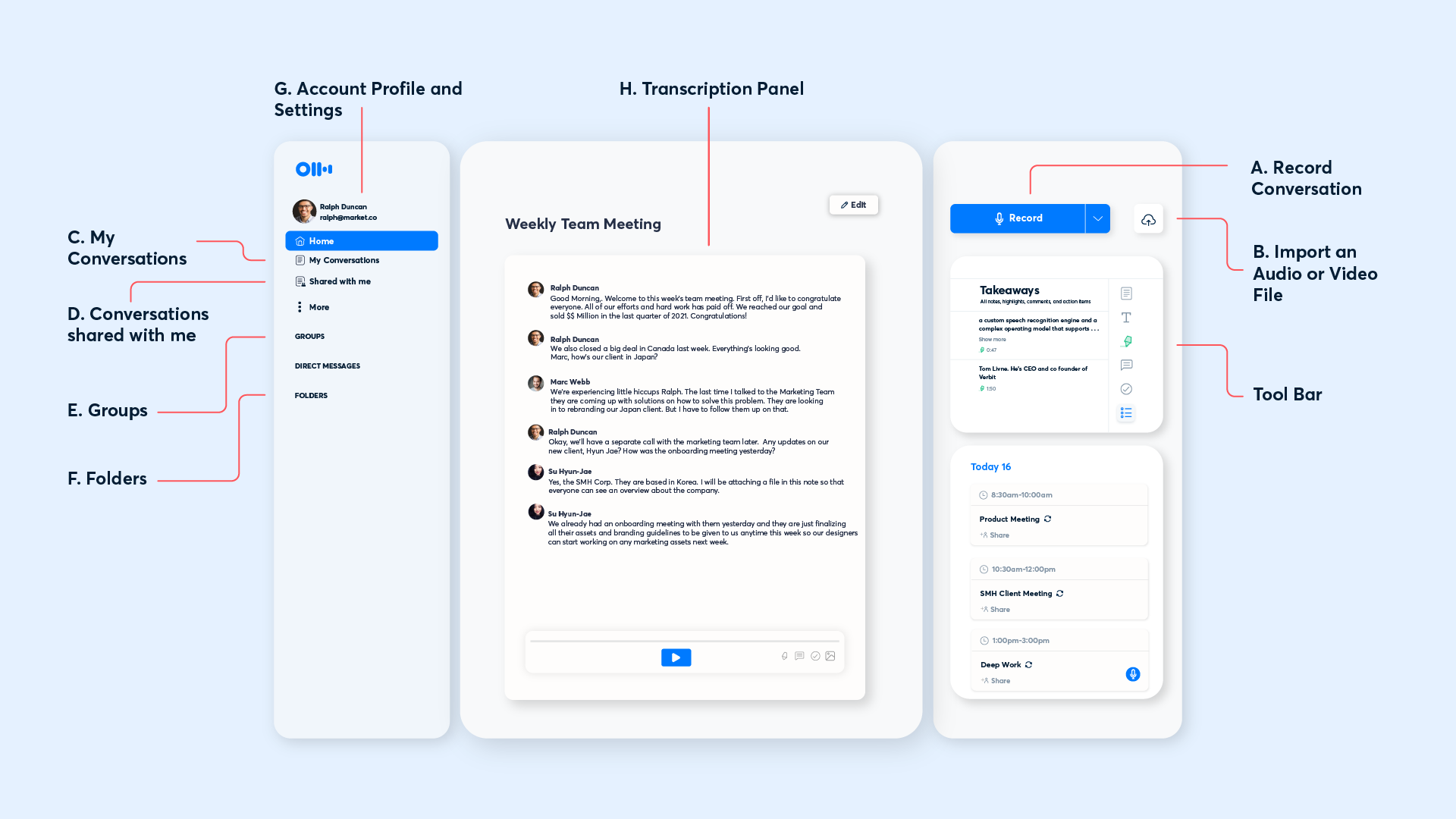
Key Features: A Deep Dive
Otter.ai boasts a robust set of features. Let's examine them with illustrative examples and real-world applications, along with some visual aids.
1. Real-Time Transcription:
This is arguably Otter.ai's flagship feature. As you speak (or as someone speaks in a meeting), Otter.ai transcribes the audio in real-time. This allows you to follow along with the conversation while simultaneously building a transcript you can review later. I've found this invaluable for complex discussions where understanding the context immediately is crucial.
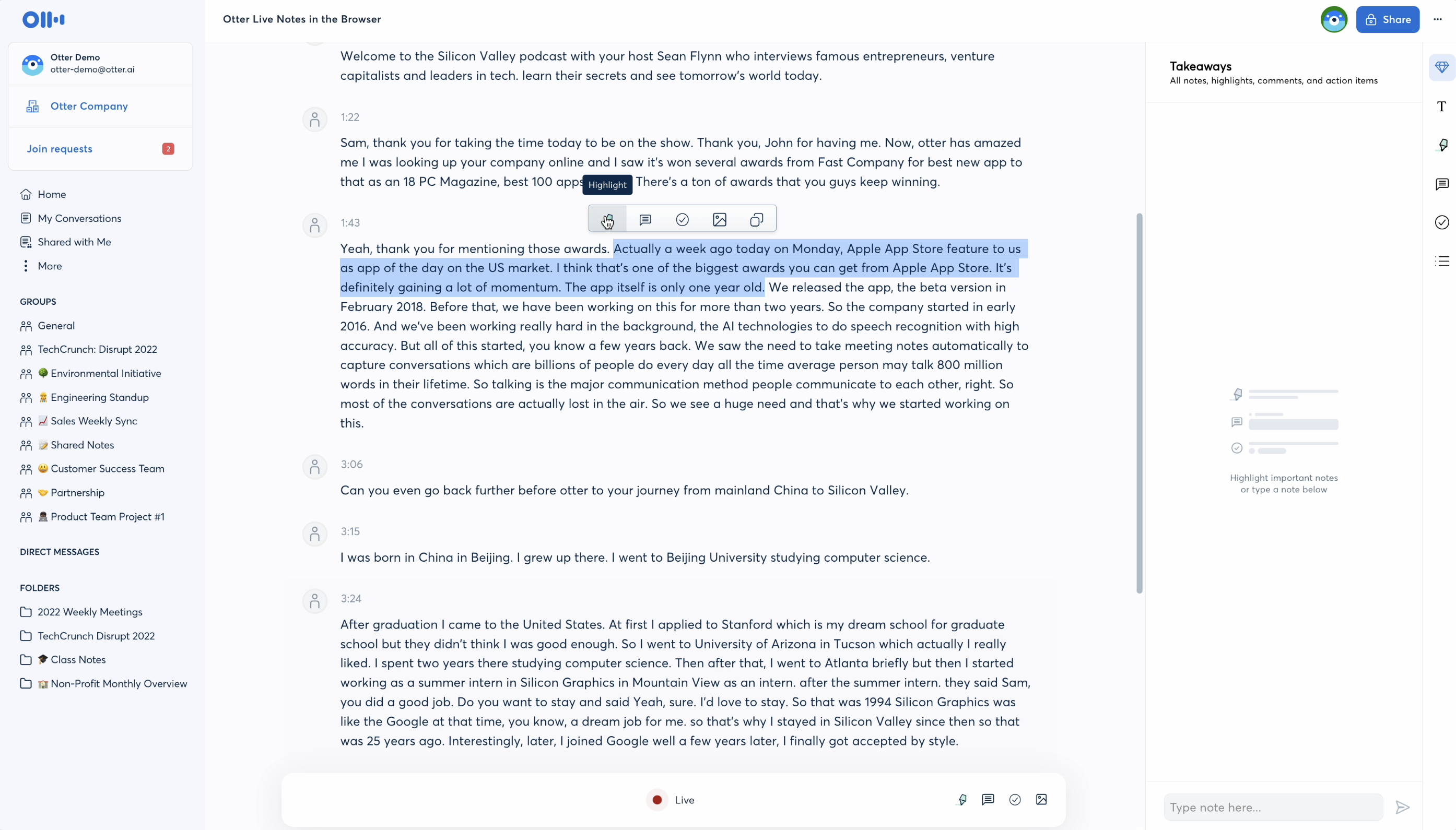
Example: During a brainstorming session about a new marketing campaign, Otter.ai allowed me to focus on contributing ideas rather than taking detailed notes. The real-time transcription provided a clear record of all suggestions, making it easy to review and prioritize later.
2. Speaker Identification:
Otter.ai can identify different speakers in a conversation, tagging each utterance with the corresponding speaker's name. This feature requires some initial training, where you identify speakers within the tool, but once set up, it significantly improves the readability and usefulness of the transcript. The accuracy has improved drastically in the past few years.
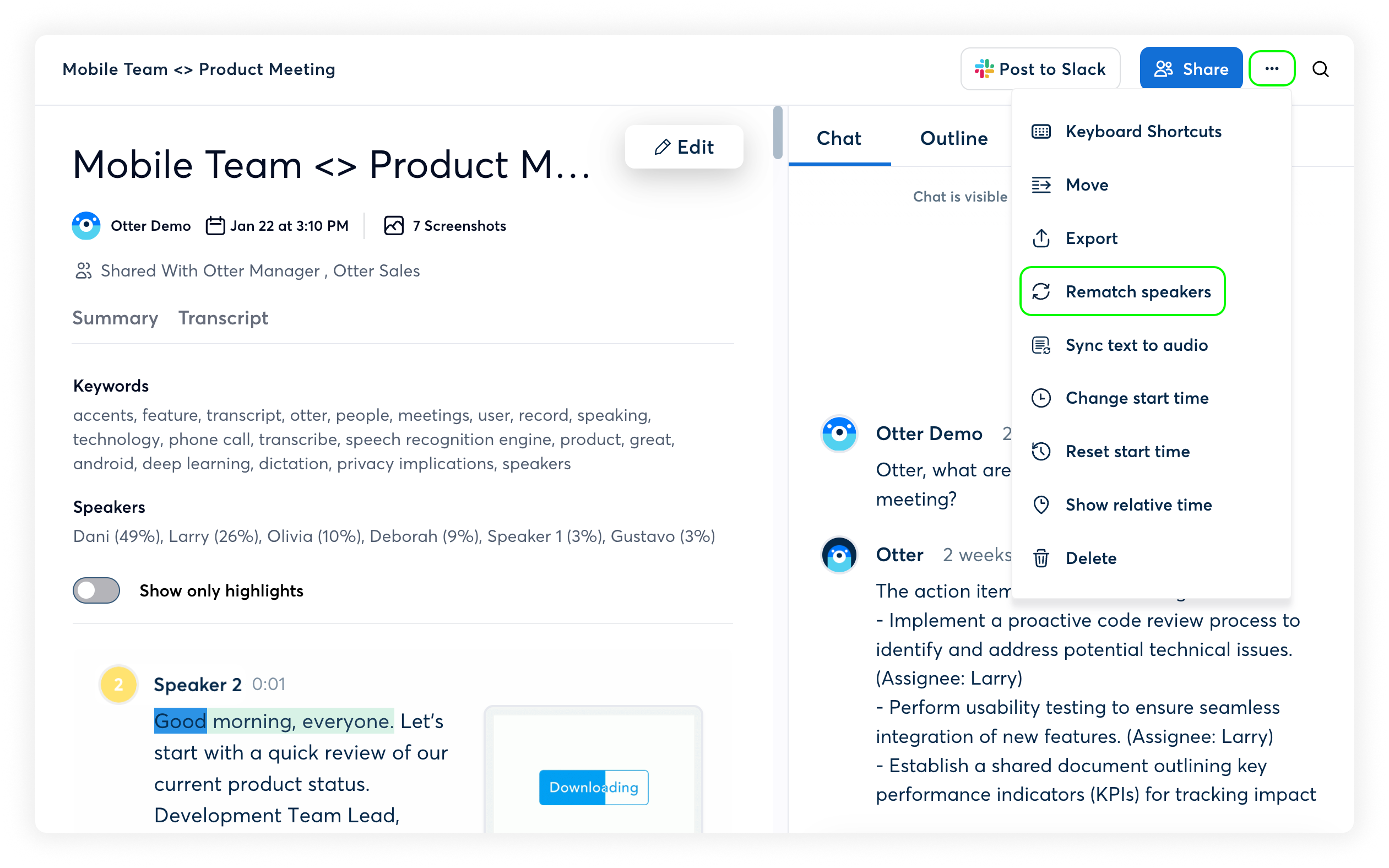
Example: In a series of interviews with potential candidates for a new role, Otter.ai accurately identified the interviewer and each interviewee, making it much easier to track their individual responses and contributions.
3. Automated Summaries:
One of the most time-saving features is Otter.ai's ability to generate automated summaries of transcripts. It uses AI to identify key topics and action items, providing a concise overview of the conversation. While not perfect, it's a great starting point for reviewing lengthy meetings and identifying important takeaways.
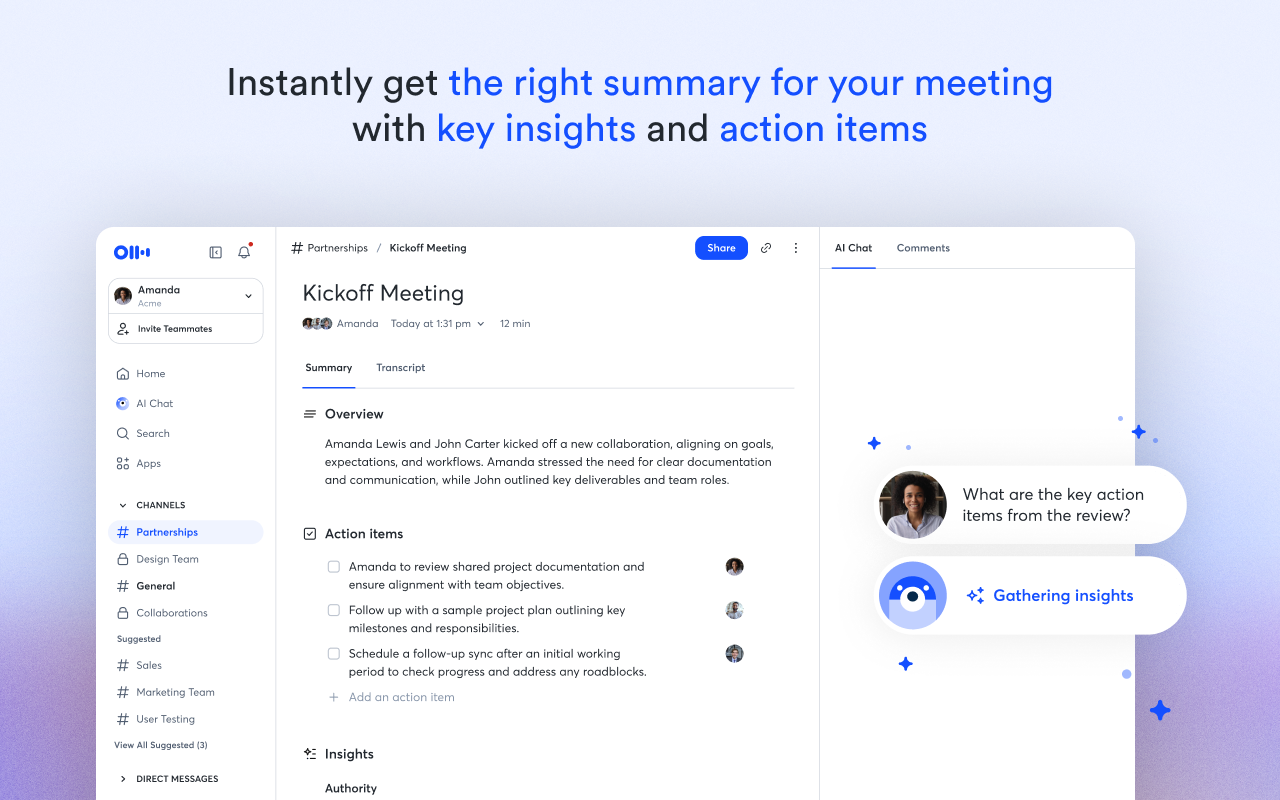
Example: After a one-hour project update meeting, Otter.ai generated a summary that highlighted the project's progress, identified potential roadblocks, and listed action items assigned to specific team members. This saved me significant time in reviewing the entire transcript.
4. Keyword Extraction:
Otter.ai can automatically extract keywords from transcripts, allowing you to quickly identify the most important topics discussed. This is particularly useful for searching through large volumes of transcribed data to find relevant information.
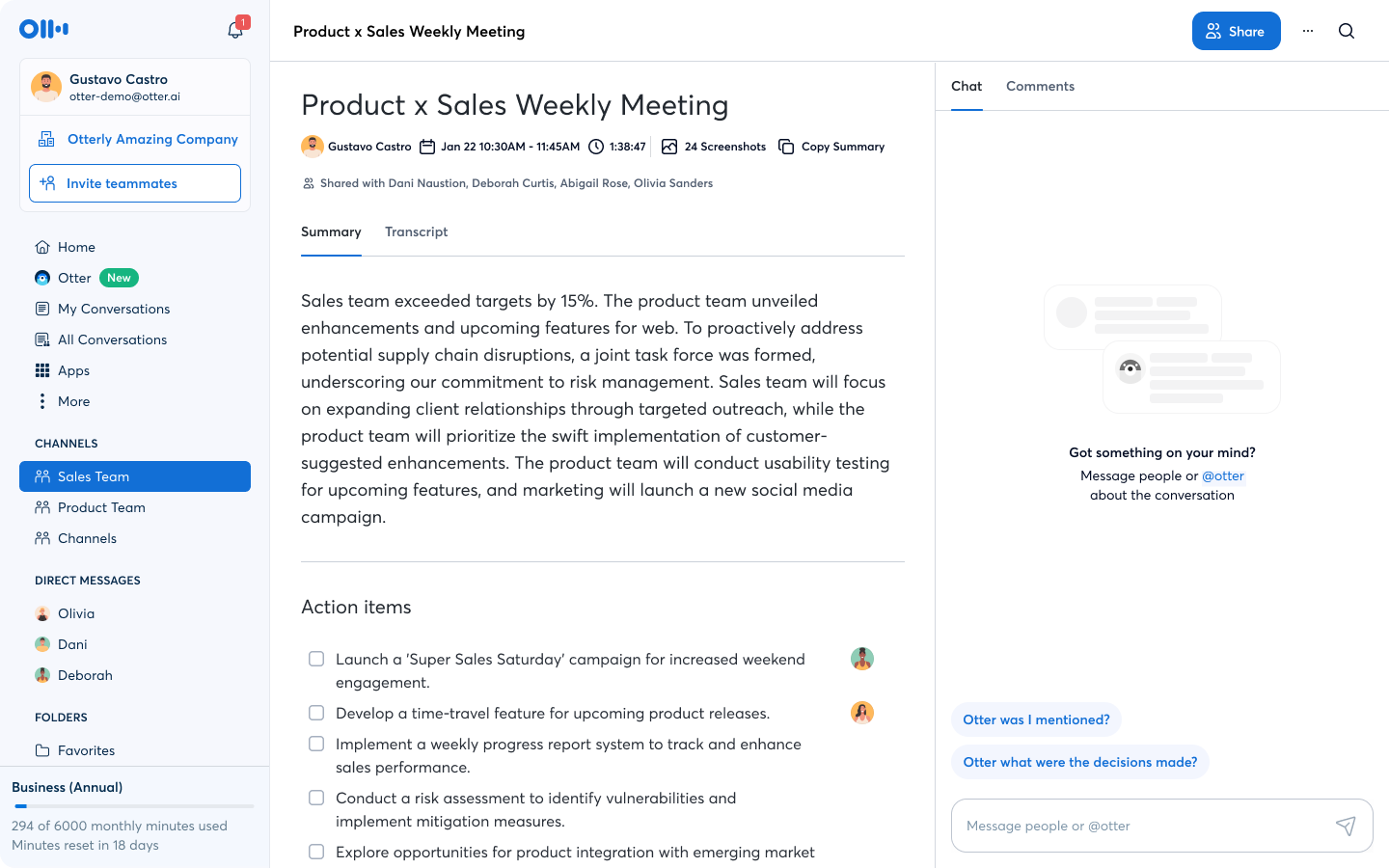
Example: When researching client feedback from multiple transcribed customer service calls, I used the keyword extraction feature to quickly identify recurring issues and areas for improvement.
5. Integration with Video Conferencing Platforms:
Otter.ai seamlessly integrates with popular video conferencing platforms like Zoom, Google Meet, and Microsoft Teams. This allows you to automatically transcribe meetings directly within these platforms, without having to manually upload recordings. This is crucial for larger teams.
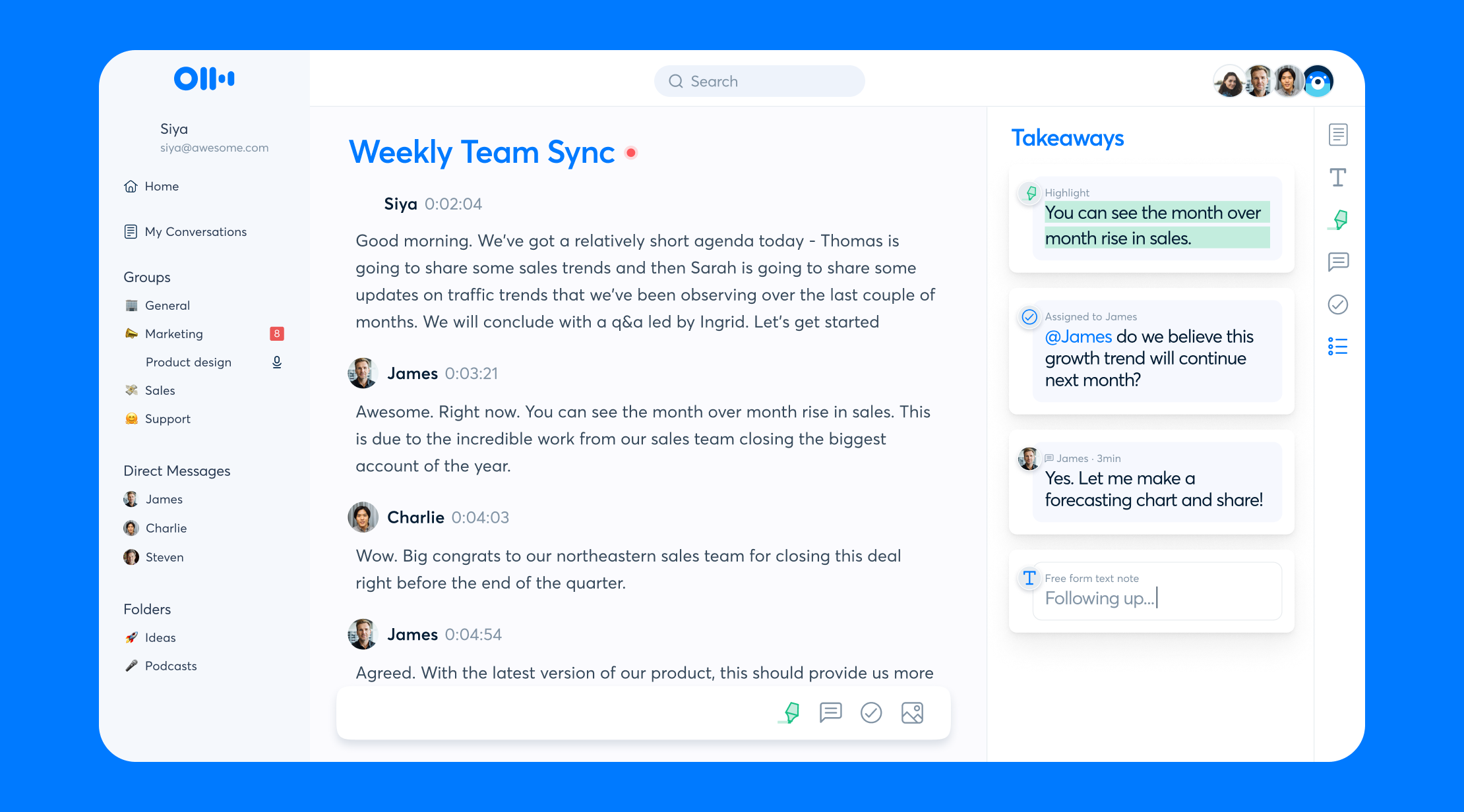
Example: We've automated our weekly all-hands meetings so that Otter.ai automatically starts transcribing at the beginning of the Zoom call. The transcript is then shared with the team afterwards, ensuring everyone has access to a complete record of the discussion.
6. Collaboration Features:
Otter.ai enables collaboration by allowing you to share transcripts with colleagues, add comments, and highlight important sections. This fosters teamwork and ensures that everyone is on the same page.
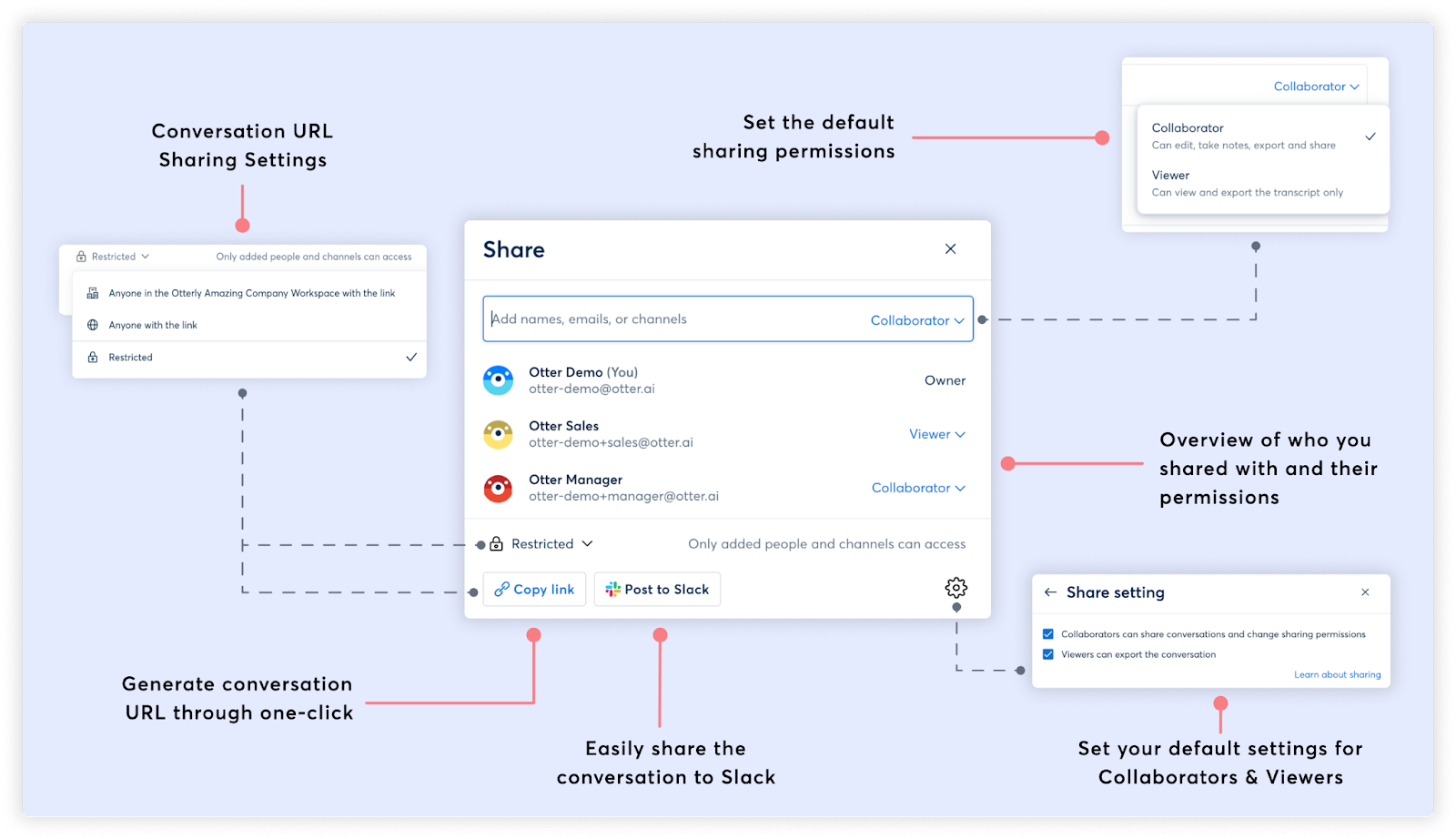
Example: During a collaborative writing project, we used Otter.ai to transcribe brainstorming sessions and then shared the transcripts with the team. This allowed everyone to contribute ideas and provide feedback asynchronously, regardless of their location or time zone.
7. Mobile App:
The Otter.ai mobile app allows you to record and transcribe audio on the go. This is incredibly useful for capturing notes during interviews, lectures, or even just personal thoughts.
Example: While attending a conference, I used the Otter.ai mobile app to record and transcribe keynotes and workshops. This allowed me to focus on listening and engaging with the speakers, without having to worry about taking detailed notes.
8. Custom Vocabulary:
Otter.ai allows you to add custom vocabulary to its dictionary, which helps to improve the accuracy of transcriptions for specialized terms or industry-specific jargon. This feature is essential for anyone working in a niche field.
Example: As a software engineer, I added common programming terms and acronyms to Otter.ai's custom vocabulary. This significantly improved the accuracy of transcriptions during code reviews and technical discussions.
Pricing (January 2026)
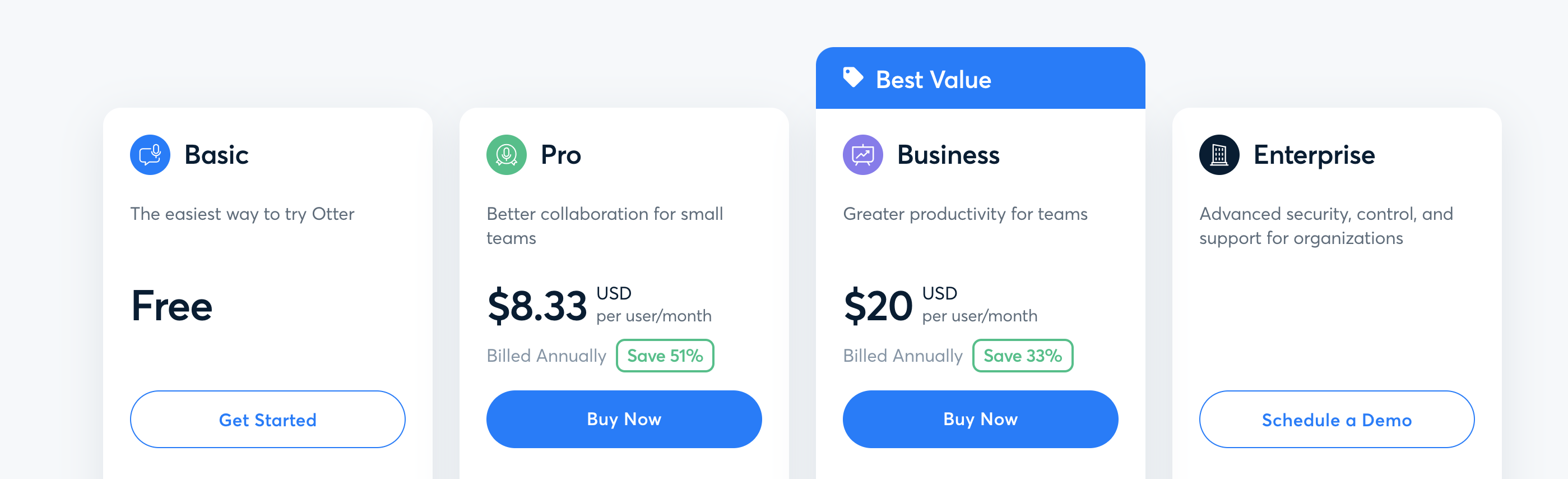
Otter.ai offers a tiered pricing structure, catering to different needs and budgets:
- Basic (Free): Offers a limited number of transcription minutes per month. This is a great option for individuals who only need occasional transcription.
- Pro ($16.99/month): Provides a significantly higher number of transcription minutes per month, advanced features like custom vocabulary, and collaboration tools. This is suitable for professionals and small teams.
- Business ($30/month): Includes all Pro features, plus team management tools, single sign-on (SSO), and enhanced security features. Ideal for larger organizations with specific security and collaboration requirements.
- Enterprise (Custom Pricing): Offers customized solutions with dedicated support, advanced security features, and tailored integrations. Contact Otter.ai directly for pricing.
Note: Pricing is accurate as of January 2026. Please check the Otter.ai website for the latest information.
Pros and Cons: A Balanced Perspective
Like any tool, Otter.ai has its strengths and weaknesses. Here's a balanced overview:
Pros:
- Excellent Transcription Accuracy: For general conversations, Otter.ai's transcription accuracy is remarkably high. It's constantly improving its algorithms to better understand different accents and speaking styles.
- Time-Saving: Automating the transcription process frees up significant time and allows you to focus on more strategic tasks.
- Improved Accessibility: Transcriptions make meetings and other audio content accessible to individuals who are deaf or hard of hearing.
- Seamless Integration: Integrations with popular video conferencing platforms and collaboration tools streamline workflows.
- Collaboration Features: Sharing and collaborating on transcripts fosters teamwork and ensures everyone is on the same page.
- Mobile App Convenience: The mobile app allows you to record and transcribe audio on the go.
- Speaker Identification: Accurately identifies and labels different speakers in a conversation.
- Custom Vocabulary: Allows you to improve transcription accuracy for specialized terms.
Cons:
- Accuracy Varies: While generally accurate, transcription accuracy can be affected by factors such as background noise, accents, and speaking speed. The better the audio quality, the better the transcription.
- Pricing Can Be a Barrier: The Pro and Business plans can be relatively expensive for individuals or small businesses with limited budgets.
- Summaries Not Always Perfect: Automated summaries can sometimes miss nuances or fail to capture the full context of the conversation. Always review them carefully.
- Privacy Concerns: As with any cloud-based service, there are potential privacy concerns associated with storing and processing sensitive audio data. Ensure you understand Otter.ai's security policies and take appropriate precautions.
- Reliance on Internet Connection: Requires a stable internet connection for real-time transcription. This can be a problem in areas with poor connectivity.
- Can Struggle with Heavily Accented Speech: Although much improved, it can still struggle with very strong or uncommon accents.
Who Should Use Otter.ai?
Otter.ai is a valuable tool for a wide range of individuals and organizations, including:
- Business Professionals: For transcribing meetings, interviews, and conference calls.
- Journalists: For recording and transcribing interviews and press conferences.
- Students: For capturing lectures and class discussions.
- Researchers: For transcribing focus groups and interviews.
- Podcasters: For generating transcripts of their podcasts for accessibility and SEO purposes.
- Legal Professionals: For transcribing depositions and court hearings.
- Anyone who needs to quickly and accurately transcribe audio or video recordings.
Who Should NOT Buy Otter.ai?
While Otter.ai offers numerous benefits, it may not be the best choice for everyone:
- Individuals with Limited Budgets: The Pro and Business plans can be expensive, especially if you only need occasional transcription. Explore free alternatives or carefully consider your usage needs before subscribing.
- Those Concerned About Privacy: If you're dealing with highly sensitive information, you may want to consider using a local transcription solution or taking extra precautions to protect your data.
- Users with Unstable Internet Connections: Real-time transcription requires a stable internet connection, so Otter.ai may not be suitable for those who frequently work in areas with poor connectivity.
- Those Seeking 100% Accuracy: While Otter.ai's transcription accuracy is generally high, it's not perfect. You'll likely need to review and edit transcripts to ensure complete accuracy.
- Users Needing Real-Time Interpretation: Otter.ai transcribes, not translates. If you need real-time interpretation into another language, this is not the tool for you.
Final Verdict: Is Otter.ai Worth It?
In 2026, Otter.ai remains a powerful and versatile AI transcription tool. Its real-time transcription, speaker identification, and automated summarization features are significant time-savers. While the pricing may be a barrier for some, the value it provides in terms of productivity and accessibility is undeniable.
For professionals and teams who regularly need to transcribe audio and video recordings, Otter.ai is definitely worth the investment. It's a reliable and efficient solution that can streamline workflows and improve collaboration.
However, if you only need occasional transcription or are on a tight budget, the free plan or alternative transcription tools may be more suitable. Carefully consider your needs and priorities before making a decision.
Overall, based on my personal experiences and observations of the current market landscape, I highly recommend Otter.ai as a leading AI transcription tool in 2026. Just be sure to explore the free trial and determine if it aligns with your specific requirements before committing to a paid subscription. Its ability to allow me to participate more fully in meetings, confident in a strong written record, has made me a consistent user for years, and I expect to continue using it in the future.
Ready to try Otter.ai?
Get Started NowWant to compare all 19 AI tools at once?
Download our free 2026 Vetted AI Index — side-by-side comparison of pricing, privacy, and performance.
Compare with Other AI Productivity Tools
| Tool | Category | Rating | Pricing |
|---|---|---|---|
Notion AI AI workspace integrating powerful capabilities into Notion | AI Productivity Tools | 4.0 | From $8/mo per user |